The new air traffic control NextGen system will be mostly satellite based, and this will be a godsend for a system which is way over due for a major upgrade. And yet, I have to ask is a satellite based system the most safe and secure system for something like this? The current system is ground based, and for the most part seems to work fine, well most of the time.
Not too long ago, I was discussing all this with a computer guru and think tanker, Troy Laclaire, and he stated; "I think a ground based approach is best, but perhaps have satellite for those areas where ground is not feasible." Okay I understand this comment and I too am a bit worried about the coming solar maximum and the loss of satellite communication in the event of a really big solar flare.
So, I told him - well, NASA almost learned the hard way with their Messenger Project orbiting Mercury during that last solar flare, thank god it missed that planet that time, or that satellite/space craft would have been a Shish Kabob of expensive metal alloy. Troy noted that there is "not much they could have done if it had hit, but you think they could have planned better?"
Indeed, he's right, and really I don't doubt for a minute that NASA engineers had not considered this, and made all the electronics battle hardened with a very thick shell. But at some point there comes a time when you can't make it any stronger, or you lose functionality. Even if the spacecraft would've survived, all the antennas and sensors would have been destroyed. They almost lost the whole thing that time.
Now then, let's get back to the issue of an "all-satellite" ATC system, are you beginning to see my concern here? Troy stated that perhaps even if we went to an all-satellite system, we should also keep the old ground based system, or "at least have a ground based fall back system in place where ever feasible so that if something does occur to the satellite system, you don't lose all abilities."
Hmm, yes, good point. Yes, and too there is a frequency allocation issue whenever there is a back-up redundancy, which is a FAA/FCC constant debate. Plus, if you get a massive solar flare the aircraft's system could go dark, and the fly-by-wire aircraft may crash anyway, which is a good many of these newer airliners, and on top of that what good does it do to have an ATC system which is up if the aircraft they are transmitting to are down and the electronics onboard are fried?
Indeed, Troy noted, that "planes already up in the air, are going to be a problem. However you want some kind of system that could take over for those that are still in flight.
You bet they are, but consider if you will that it any time there are between 2650 to 5000 flights over the United States of America or within our territorial boundaries and any to a given time. Can you imagine 5000 flights declaring an emergency at the same time? Holy heck Batman!
 Like other Windows Operating Systems, Windows 7 Unknown Device is due to similar reasons, mainly because of driver installation problems. Here are several reasons why unknown device problems occur:
Incompatible Drivers:
Due to advancement of technology, problems with hardware devices might arise because of incompatible device drivers. This is due to the fact that an installed OS does not support the device driver requirement for a particular hardware device. This is the most common reason for Unknown Device Problems in Windows 7, as an example: installing a 64-bit driver for a hardware device on a computer running 32-bit Operating System will not work.
Corrupted Drivers:
Another reason that contributes to Windows 7 Troubles with Unknown Device is corrupted drivers. Just a simple installation of a program or software application may affect the functionality of your device drivers. System or program related errors will also damage your device drivers, and there are malicious programs such as Trojans and computer viruses that corrupt files and data including device drivers.
Missing Device Drivers:
After installing or upgrading your Windows 7 Operating System, you need to install drivers for particular hardware such as printer, sound card or video card. If you fail to install the required device driver, your hardware device will be reported as Windows 7 Unknown Device.
Outdated Drivers:
Device drivers may eventually become outdated due to the newer versions of drivers being released by manufacturers. Some of the dangers of having outdated drivers are: conflict with new software/hardware or it may affect your computer stability. It may also trigger the hardware device using the outdated device driver to stop functioning because of the changes in your system setup induced by new software applications installed on your computer.
Defective Hardware Devices:
You may also encounter Windows 7 Unknown Device due to defective hardware devices. It might occur when your computer is unable to establish proper connection with your hardware device because of loose or damaged cables, connectors, or plugs.
Windows 7 Problems with Unknown Device are troublesome even for experienced PC user, but here are several ways to solve or prevent these problems:
Ensure Compatible Hardware Device:
One way to prevent Windows 7 Problems with Unknown Device is to refrain from using\installing a hardware device which is not supported by Windows, more precisely by Windows 7. Due to the fact that there are device drivers that are not recognized by Windows 7, you might check for "Windows 7 compatibility logos or stickers" before purchasing new hardware devices.
Knowing Your Computers' Capability:
Before downloading a hardware driver and installing it to your computer, you must first check the compatibility of your computer with hardware devices. It is necessary to know the type of your Operating System, if it is a 32-bit or 64-bit to prevent Windows®7 Unknown Device.
Note: Specified 64-bit device drivers will not work on computers using 32-bit Operating System.
Be Updated All the Time:
Built-in device drivers which support various hardware and peripherals are available upon installation of Windows 7. One important concept to remember is that even if you are using the latest version of OS, the drivers are still dated. This means that your current drivers will eventually be outdated in the succeeding weeks or months, and to prevent Unknown Device Problems in Windows 7 due to outdated drivers is to have a regular routine of updating all drivers installed on your computer.
Safeguard Your Hardware Devices:
Checking if the plug is loose or intact, especially with portable devices will help you avoid driver related problems.
 You may have read some of the numerous articles about solid state drives, or SSDs, in the last couple years. Do they make you wonder what they are all about and are they right for you? This article will give you the details on the latest SSDs so you can make an informed decision.
Standard hard disk drives, or HDDs, are designed using moving mechanical components that use considerable amounts of power, restrict the computer's performance speed and incorporate fragile moving parts that can malfunction and aren't difficult to damage. Solid state drives use microchips to store information in more stable memory chips and have no moving parts. Therefore SSDs use less power, are extremely durable, are very quiet and give better performance.
Below are some reasons why a solid state drive is better then standard hard drives.
- More reliable:The design of a SSD doesn't use disks or have moving components at all, therefore the drive doesn't have any mechanical parts to malfunction. The longer a regular hard disk drive is used the more likely that the rapidly spinning disk may become misaligned or a mechanism will stop functioning correctly.
- Resistant to vibration, shock and temperature:Because there isn't any moving parts or disks spinning at high rates of speed, SSDs are far less sensitive to vibrations and the shock caused by an impact. SSDs are also able to continue performing in a wider range of temperatures, they work well in temperatures ranging from 32-158 degrees Fahrenheit. This is compared to 41-131 degrees Fahrenheit, which is the safe operating temperatures for a HDD.
- Faster data transfer speeds:When you turn on your computer or open a program, the wait time that you experience is caused by your HDD finding and retrieving the necessary files. Since an SSD is built without any moving parts to slow it down, data is transmitted much faster then with a HDD. For example, applications load 67% faster and Windows XP boots around 45% faster from an SSD compared to a standard HDD.This gives you an idea of the difference you may enjoy, even though actual speeds may differ with different SSD capacities and models.
- Less power consumption:SSDs use up to 45% less power, when compared to a HDD. Creating less of a strain on the computer and extending the battery life for laptops.
- Produce less heat:Since they don't have any moving parts they produce less heat, in fact they run about 20% cooler. This means that all the components of the computer are less susceptible to heat related damage. It also means that less cooling fans are required, reducing the power requirements of the entire system.
- Quiet and light weight:With the absence of moving parts, an SSD produces absolutely no noise. It also ways about half as much as a HDD.
SSD simply offer improved durability and performance. The only draw back of a SSD is the cost, as is usually the case with new technology. Right now they are a more expensive then a HDD but, this gap is closing lately and will continue to do so in the future.
 Every year, a lot of household and commercial electronic and electrical equipment are improperly disposed of in landfills. Improper disposal of electronic wastes are detrimental to the environment and also impact the health condition of the community. Some electronic wastes have components or parts that contain mercury, lead, cadmium, and other hazardous elements. Over a period of time, these equipments, that have been accumulating in the landfill, break down and release these dangerous substances in the soil and water.
Electronic and electrical equipment are necessities in the home and workplace. Although these items are valued for their specific purpose, they are easily ditched for new and upgraded models once obsolete. To ensure that these items are properly disposed of, supportive environmental legislation had been enacted to provide regulations and rules for compliance.
Every year, a lot of household and commercial electronic and electrical equipment are improperly disposed of in landfills. Improper disposal of electronic wastes are detrimental to the environment and also impact the health condition of the community. Some electronic wastes have components or parts that contain mercury, lead, cadmium, and other hazardous elements. Over a period of time, these equipments, that have been accumulating in the landfill, break down and release these dangerous substances in the soil and water.
Electronic and electrical equipment are necessities in the home and workplace. Although these items are valued for their specific purpose, they are easily ditched for new and upgraded models once obsolete. To ensure that these items are properly disposed of, supportive environmental legislation had been enacted to provide regulations and rules for compliance.
About the WEEE Directive
The overall aim of the Waste Electrical and Electronic Equipment (WEEE) Directive is to encourage the recovery, reuse and recycling of electrical and electronic equipment by requiring manufacturers to take responsibility in recycling their products. WEEE recycling requires compliance not only from product manufacturers but also importers, retailers, sellers and businesses with equipment to dispose.
The directive supports the establishment of take-back facilities that provides free or minimal fees for collecting WEEE equipment. As a result of the directive, some retailers take back the product themselves to ensure proper disposal and recycling.
Individuals can help enforce the direct by actively implementing WEEE recycling at home. WEEE directive, per se, does not have a provision penalizing individuals and households for disposing equipment in the bin, however, ensuring proper disposal of the items is a responsibility of all members of the community.
Recycling at Home
T
here are several things that households can do to ensure WEEE recycling at home. The first step is to know what items are classified under WEEE. According to the UK Environmental Agency, equipment that fall under this category includes household appliances, IT and telecommunication equipment, consumer equipment, lighting, electrical and electronic tools, toys and leisure equipment, automatic dispensers, and monitoring and control equipment. Medical devices are also included in the list but are exempted from recovery and recycling targets.
Households are encouraged to separate WEEE items using the list as a reference. Once these items are ready for recycling, the next step is to look for a list of civic amenity, take back or government-supported facilities that are required by law to receive the items.
Another option is to contact local retailers and sellers and ask for their take-back policy for previously purchased products. If the take back option is not available, obtain information about recommended facilities and recycling centers. Take note that the WEEE directive requires retailers to provide information about facilities and procedures for proper disposal of electronic and electrical items.
Proper disposal of WEEE items provide long term benefits to the community and the environment. As part of the community, households play an important role in ensuring successful compliance to the provisions of the WEEE directive and other environmental regulations.
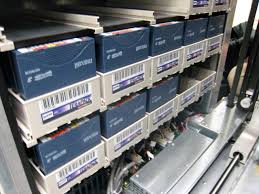
There are three factors to consider when evaluating whether to use tape or disk as a primary back up module for your personal information or for your small business. These factors are cost, performance and manageability.
There has been a drop in the price of disk storage that has led to many organizations adding disk as their backup mechanism, which I believe is just psychological with respect to modernization – disks seem more modern than tapes like the evolution of cassette tapes for music to CDs. However as through time’s test, tapes have kept their competitive edge with respect to long term storage.
As for performance tape drives have evolved to become very fast, some capable of writing at 280 MBps – a figure that outperforms disk – particularly the cheaper disks normally chosen for backup. However, the infrastructure you have should support tape as the medium really suffers in less than optimum conditions.
When it comes to a restore needed, the seek time on a disk can be a matter of a few milliseconds whereas a tape can take longer and you may end up having to locate the correct physical tape then loading it into a drive.
Touching on manageability, tapes portability is its obvious advantage. They can be restored offsite, protecting them from system wide disruptions. Disks do not have that flexibility though strong networking makes transfer of data to your remote site a breeze, providing the same benefit.