
Apple Ipad 2 – US $750 (approx) – Wi-FI, 16GB
A year after it’s birth apple’s tablet has been slimmed down and pumped up to cope with a horde of imitators. But are two cameras and a faster processor enough to keep ahead of the pack? Lets put some notes down shall we;
· The 9.7in screen has the same gorgeous edge to edge glass and 1024x768 resolution. Colours are punchier, but web pages can still look a little grainy before you zoom in. The contrast has been boosted to wash whites whiter, so while the kindle still beats its’ outdoors, it is more e-book friendly than it was. Widescreen videos are sadly, still cropped.
· Losing 79g makes more of a difference than you might expect. The slim new iPad sits much more comfortably in your hand, and has less of a tendency to slip while gaming. A skin is still a good idea for taking the iPad out and about, as the shinier metallic back can pick up scratches.
· The new A5 chip shaves the odd second from surfing, but you’ll notice it more when app hoping; transitions are shorter and smoother. Apple claims up to nine times the graphics performance, but other than a mite less stutter during really intensive games, we can’t see why. Perhaps the upgrade will be more clearer when more demanding apps emerge.
· Apple has leap frogged voice calls and headed straight for our video-phoning future. A tiny front-facing camera lets you make free Face Time calls to Mac and iPhone 4-owning friends although as yet there is no iPad optimized app for skype or google talk. All of which makes it handy for chatting about each other’s iPads, but a long way from being essential.
· Holding the iPad 2 like a camera looks weird, feels weird and produces weird results. The terrible 0.7 MP still photos would shame a budget camera phone and the HD videos, while a lot better, aren’t as rich or natural as those from the iPhone 4. There’s no LED flash and no features to pimp your snaps either.
· There is no sign of the 4G revolution in the region leaving us with a choice between Wi-Fi only and Wi-Fi plus 3G. There is no Thunderbolt (nor USB) either, although you can mirror whatever is on your iPad’s screen on a TV via HDMI with an optional adaptor.
Apple also comes with some additional stuff like these:-
1. Smart cover from US $40. An ingenious magnetic screen protector that wakes and sleeps your tablet and doubles as a stand.
2. Jorno folding keyboard at US $100. Bluetooth keyboard and built-in dock that folds down to just 9 centimetres squared. Lasts a month on a single charge.
3. iSkin Summit from US $95. Treat your iPad to a cosy impact and water resistant sleeve with heavy-gauge zippers and strap.
4. Digital AV-adapter at US $40. Is 9.7in just too small for you? Mirror your iPAd 2 on any HDMI equipped telly, while it charges
During your first hour this was the experience we had with the apple Ipad 2.
· Minute 1 – Awesome origami style unwrapping experience.
· Minute 2 – Light lusciously tactile and fully charged.
· Minute 5 – Love the eye popping photo booth app
· Minute 7 – Hate the terrible sub megapixel still photos.
· Minute 10 – iTunes crashes mid install. Impatient!
· Minute 15 – iTunes crashes for the third time. Aaargghh!
· Minute 27 – All apps up and running in super quick time.
· Minute 42 – The apps grid interface is starting to look tired.
· Minute 49 – First Face Time call. Great sound great vision.
· Minute 55 – Browsing and multi-tasking with no speed drop
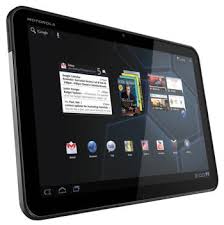
Motorola Xoom 3G US $975 (approx)
Motorola has dipped honey comb in all manner of high-tech tastiness to create the first full-fat android tablet. But is the Xoom sweet enough to tempt you away from Aple? Lets count the honey combs, shall we;
· The 10.1 in screen is a shade larger, wider and sharper than the iPad’s, but also a bit slower to respond. Colours look great and HD Video is smooth and solid. Somehow though, Motorola has managed to find a screen that is even more of a magnet for greasy fingerprints than Apple’s.
· Thanks to its’ dual-core processor, the Xoom has power to spare and can easily juggle five apps at once – even games. Prepare, then, for multitasking surprises such as navigation voice directions cutting through the angry birds soundtrack. Not that you’ll ever be driving and flinging fowl at the same time, obviously…..
· The customizable cluttered craziness of Honeycomb’s five home screen is a welcome antidote to Apple’s sterile grid. Widgets work especially well, letting you scan emails, check who is on facebook and browse YouTube with ease. This could be the future of tablet computing – if Google gets the occasional freezes under control.
· It’s very early for honeycomb apps and it shows. The best-selling apps on adroid market are an incredibly buggy CNN app, an Angry Birds port that judders and a pulse news reader that adds nothing to the Apple version. But the potential is there – 3D platformer Cordy shows that beautiful, responsive, flicker-free apps are possible. Watch this space.
· We’re not certain there’s much point to back-facing scams on tablets – will people really use them? Still the Xoom’s main 5MP camera is pretty good, with better detail and exposure than most mobiles and sharp colorful 720p video. The camera app is ungainly with terrible shutter lag, but you won’t use that too much; more importantly, the 2MP front facing webcam is fine for video chat.
· Although plastic backed, the Xoom is easy to hold and feels as if it’ll handle a few knocks. Connectivity includes mini HDMI, USB sockets and a SIM card slot (a Wi-Fi only model will soon be available for US $800). One niggle is that the headphone socket is placed midway along the top edge - perfectly placed to dangle a lead over the screen.
It also has some additional goodies like:-
1. Speaker HD Dock US $145. Boosts the Xoom sound quality a bit, charge it up and enjoy a hands free video chat.
2. Motorola Wireless Keyboard US $120. Connect the Xoom to a TV via mini HDMI, pair this Bluetooth keyboard and voila: Google TV
3. Motorola Folio Case US $50. Protection that will not look out of place on the boardroom table, and which doubles up as a stand.
4. Car Charger US $30. Small, functional and almost guaranteed not to fit in any other portable device you own.
Here is our first hour with the Xoom:-
· Minute 01: Reach around for the rear mounted power button.
· Minute 03: Honeycomb is like android crossed with windows
· Minute 04: First app crashes – Facebook is down.
· Minute 13: Google widgets and apps look fantastic.
· Minute 23: Wi-Fi connection hassles back to 3G.
· Minute 31: Chrome browser rocks, but where’s my flash?
· Minute 39: Google maps navigation could be a world beater.
· Minute 45: If it wasn’t for that glary smeary screen.
· Minute 50: Browsing music is a real joy thanks to the display.
· Minute 60: Ten apps multi-tasking without a hiccup.
Review
There you have it, but what does techy gadgetz think about these two? Well we are not pros – as such – but for the Apple ipad we say……..Leaner, meaner and for a while longer atleast, still the smoothest tablet experience.
The Xoom…..Brilliant, beautiful, but buggy, the Xoom shows there is a viable alternative to iOS
If you want it in rating, we give the Apple iPad 2 (drums) 5 stars and the Motorola Xoom (bottles crashing) 4 stars, but hey that is what Techy Gadgetz guys say. What do you think…mmhhh?

